
Appearance
Report API
Overview
This document describes the Open API endpoints for reporting. All API endpoints require authentication via Bearer token in the Authorization header.
Authentication
All API requests must include a valid authorization token in the request header:
Authorization: Bearer <your_auth_token>You can get your token by navigating to Integration -> SDK & API -> Reporting API on publisher portal. 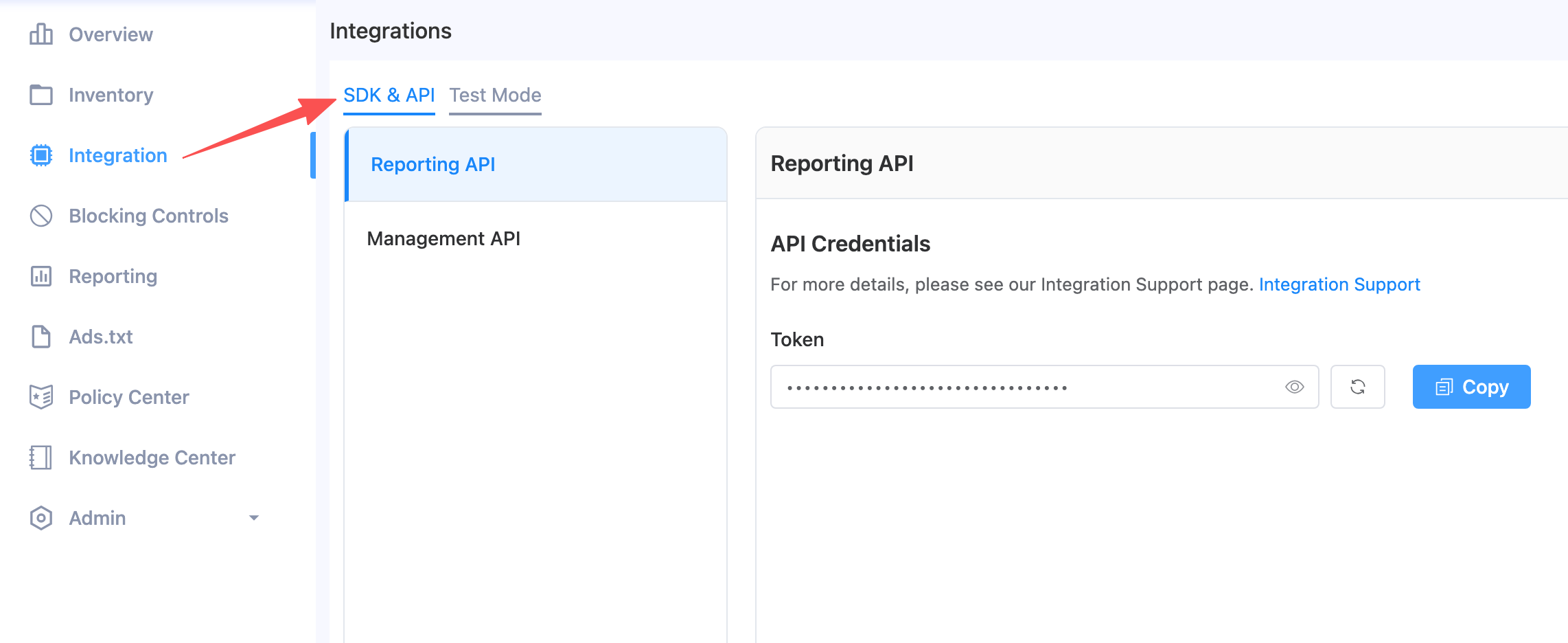
Query Report Data
Retrieves report data with flexible filtering and grouping.
Endpoint: POST https://ofp.adx.opera.com/openapi/report/v1/query
Request Body:
| Field | Type | Required | Description |
|---|---|---|---|
| filters | Filter[] | Yes | Filter conditions (must include day filter) |
| measurements | Measurement[] | Yes | Metrics and dimensions to retrieve |
| offset | int | No | Pagination offset (default: 0) |
| limit | int | Yes | Number of records to return |
Filter Object:
| Field | Type | Description |
|---|---|---|
| name | string | Filter field name (e.g., "day", "app_id", "slot_id") |
| value | any | Filter value (array for date range or ID list) |
Measurement Object:
| Field | Type | Description |
|---|---|---|
| name | string | Metric or dimension name |
| sort | string | Sort direction ("desc", "asc", or "" for no sorting) |
Available Measurements:
| Name | Type | Description |
|---|---|---|
| day | dimension | Date (YYYYMMDD) |
| publisher_id | dimension | Publisher ID |
| app_id | dimension | App ID |
| slot_id | dimension | Placement ID |
| country_code | dimension | Country code |
| traffic_type | dimension | Traffic type (App/Web) |
| sdk_ad_format | dimension | SDK ad format |
| os_type | dimension | Operating system type |
| costs | metric | Revenue (USD) |
| cost_ecpm | metric | eCPM (USD) |
| requests | metric | Ad requests |
| responses | metric | Ad responses |
| impressions | metric | Ad impressions |
| clicks | metric | Ad clicks |
| ctr | metric | Click-through rate |
| cpc | metric | Cost per click |
| fillrate | metric | Fill rate (responses/requests) |
| showrate | metric | Show rate (impressions/responses) |
Example Requests:
1. Query daily summary (metrics only, no dimension breakdown):
json
{
  "filters": [{ "name": "day", "value": ["20260106", "20260113"] }],
  "measurements": [
    { "name": "day", "sort": "desc" },
    { "name": "costs", "sort": "" },
    { "name": "requests", "sort": "" },
    { "name": "impressions", "sort": "" },
    { "name": "clicks", "sort": "" },
    { "name": "ctr", "sort": "" },
    { "name": "showrate", "sort": "" }
  ],
  "offset": 0,
  "limit": 50
}
2. Query with breakdown by publisher, app, and placement:
json
{
  "filters": [{ "name": "day", "value": ["20260106", "20260113"] }],
  "measurements": [
    { "name": "day", "sort": "desc" },
    { "name": "publisher_id", "sort": "" },
    { "name": "app_id", "sort": "" },
    { "name": "slot_id", "sort": "" },
    { "name": "costs", "sort": "" },
    { "name": "requests", "sort": "" },
    { "name": "impressions", "sort": "" },
    { "name": "clicks", "sort": "" },
    { "name": "ctr", "sort": "" },
    { "name": "showrate", "sort": "" }
  ],
  "offset": 0,
  "limit": 50
}
3. Query filtered by specific app:
json
{
  "filters": [
    { "name": "day", "value": ["20260106", "20260113"] },
    { "name": "app_id", "value": ["app13916722328256"] }
  ],
  "measurements": [
    { "name": "day", "sort": "desc" },
    { "name": "costs", "sort": "" },
    { "name": "requests", "sort": "" },
    { "name": "impressions", "sort": "" },
    { "name": "clicks", "sort": "" },
    { "name": "ctr", "sort": "" },
    { "name": "showrate", "sort": "" }
  ],
  "offset": 0,
  "limit": 50
}
4. Query filtered by specific placement (with all dimensions and metrics):
json
{
  "filters": [
    { "name": "day", "value": ["20260106", "20260113"] },
    { "name": "slot_id", "value": ["s13916752438656"] }
  ],
  "measurements": [
    { "name": "day", "sort": "desc" },
    { "name": "publisher_id", "sort": "" },
    { "name": "app_id", "sort": "" },
    { "name": "slot_id", "sort": "" },
    { "name": "country_code", "sort": "" },
    { "name": "traffic_type", "sort": "" },
    { "name": "sdk_ad_format", "sort": "" },
    { "name": "os_type", "sort": "" },
    { "name": "costs", "sort": "" },
    { "name": "cost_ecpm", "sort": "" },
    { "name": "requests", "sort": "" },
    { "name": "responses", "sort": "" },
    { "name": "impressions", "sort": "" },
    { "name": "clicks", "sort": "" },
    { "name": "ctr", "sort": "" },
    { "name": "cpc", "sort": "" },
    { "name": "fillrate", "sort": "" },
    { "name": "showrate", "sort": "" }
  ],
  "offset": 0,
  "limit": 50
}
Response for Example 1 (daily summary):
json
{
  "message": "ok",
  "rows": [
    {
      "day": "20260112",
      "costs": "0.015609749999999999",
      "requests": "141",
      "impressions": "13",
      "clicks": "1",
      "ctr": "0.07692307692307693",
      "showrate": "0.20967741935483872"
    },
    {
      "day": "20260107",
      "costs": "0",
      "requests": "0",
      "impressions": "0",
      "clicks": "0",
      "ctr": "0",
      "showrate": "0"
    }
  ],
  "statusCode": 0,
  "total": 2
}
Response for Example 2 (with dimension breakdown):
json
{
  "message": "ok",
  "rows": [
    {
      "day": "20260112",
      "publisher_id": "pub13124398458816",
      "publisher_name": "OperaRTB",
      "app_id": "app13336434553408",
      "app_name": "New SDK demo App",
      "slot_id": "s13584962043136",
      "slot_name": "New SDK demo App_Rewarded_Vertical",
      "costs": "0.010806749999999999",
      "requests": "0",
      "impressions": "9",
      "clicks": "1",
      "ctr": "0.1111111111111111",
      "showrate": "9"
    }
  ],
  "statusCode": 0,
  "total": 8
}
Response for Example 4 (all dimensions and metrics):
json
{
  "message": "ok",
  "rows": [
    {
      "day": "20260112",
      "publisher_id": "pub13124398458816",
      "publisher_name": "OperaRTB",
      "app_id": "app13336434553408",
      "app_name": "New SDK demo App",
      "slot_id": "s14353628765376",
      "slot_name": "New SDK demo App_Rewarded Interstitial_Vertical",
      "country_code": "US",
      "traffic_type": "App",
      "sdk_ad_format": "Rewarded Interstitial",
      "os_type": "ANDROID",
      "costs": "0",
      "cost_ecpm": "0",
      "requests": "16",
      "responses": "13",
      "impressions": "0",
      "clicks": "0",
      "ctr": "0",
      "cpc": "0",
      "fillrate": "0.8125",
      "showrate": "0"
    }
  ],
  "statusCode": 0,
  "total": 12
}
Response Fields:
| Field | Description |
|---|---|
| message | Status message |
| rows | Array of report data rows (fields depend on requested measurements) |
| statusCode | Status code (0 = success) |
| total | Total number of matching records |
Error Handling
All API responses follow a consistent format:
Success Response:
json
{
  "code": 0,
  "msg": "ok",
  "data": { ... }
}
Error Response:
json
{
  "code": <error_code>,
  "msg": "<error_message>"
}
Common Error Codes
| Code | Description |
|---|---|
| 400 | Bad Request - Invalid parameters |
| 401 | Unauthorized - Invalid or missing token |
| 403 | Forbidden - Insufficient scope |
| 500 | Internal Server Error |
Rate Limiting
API requests are subject to rate limiting. If you exceed the rate limit, you will receive a 429 Too Many Requests response. Please implement appropriate retry logic with exponential backoff.