
Appearance
Client Bidding (C2S) Integration
Client Bidding allows you to run ad auctions on the client side, giving you full control over the bidding process and auction results.
Integration Flow
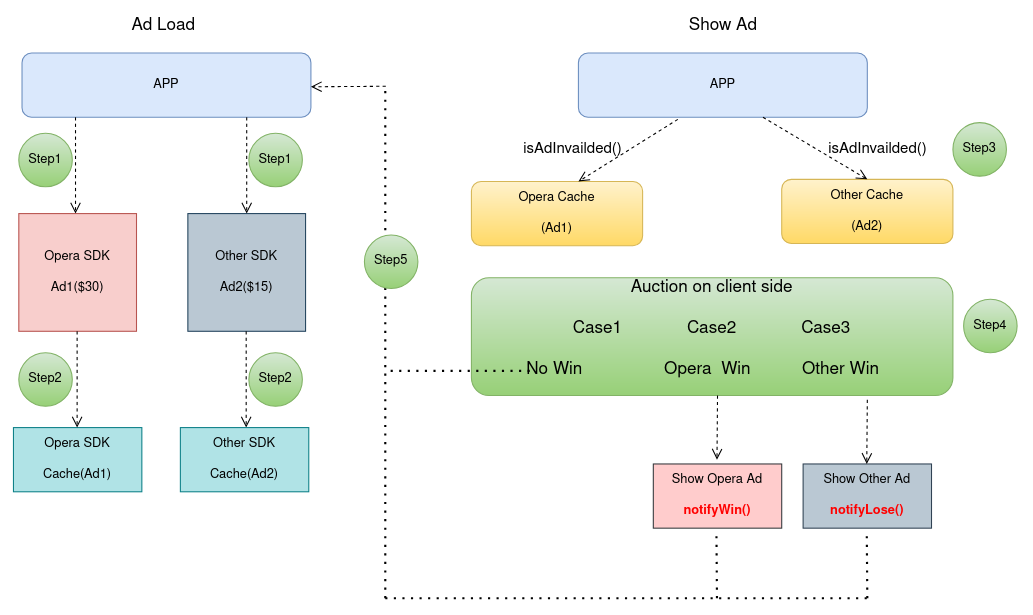
How It Works:
- Load Ads in Parallel: Call
loadC2SBidAd()for Opera and other ad sources simultaneously - Run Client-Side Auction: When ready to show, compare eCPM using
getBid().getEcpm() - Notify Results: Winner calls
notifyWin(), losers callnotifyLose() - Show Winner: Display the ad with the highest eCPM
Loading Client Bidding Ads
Code Example (Java)
java
import com.opera.ads.AdBid;
import com.opera.ads.LossReason;

// Native Ads
NativeAdLoader.loadC2SBidAd(context, "PLACEMENT_ID", new NativeAdListener() {
    @Override
    public void onAdLoaded(@NonNull NativeAd nativeAd) {
        // Ad loaded successfully
        mNativeAd = nativeAd;
    }
    // ... other callbacks
});

// Banner Ads
mBannerAdView.loadC2SBidAd(new BannerAdListener() {
    @Override
    public void onAdLoaded(@NonNull BannerAd bannerAd) {
        // Ad loaded successfully
    }
    // ... other callbacks
});

// Interstitial Ads
InterstitialAd.loadC2SBid(context, "PLACEMENT_ID", new InterstitialAdLoadListener() {
    @Override
    public void onAdLoaded(@NonNull InterstitialAd ad) {
        mInterstitialAd = ad;
    }
    // ... other callbacks
});

// Rewarded Ads
RewardedAd.loadC2SBid(context, "PLACEMENT_ID", new RewardedAdLoadListener() {
    @Override
    public void onAdLoaded(@NonNull RewardedAd ad) {
        mRewardedAd = ad;
    }
    // ... other callbacks
});

// Rewarded Interstitial Ads
RewardedInterstitialAd.loadC2SBid(context, "PLACEMENT_ID", new RewardedInterstitialAdLoadListener() {
    @Override
    public void onAdLoaded(@NonNull RewardedInterstitialAd ad) {
        mRewardedInterstitialAd = ad;
    }
    // ... other callbacks
});

// App Open Ads
AppOpenAd.loadC2SBid(context, "PLACEMENT_ID", new AppOpenAdLoadListener() {
    @Override
    public void onAdLoaded(@NonNull AppOpenAd ad) {
        mAppOpenAd = ad;
    }
    // ... other callbacks
});
Getting Bid Information
After loading a client bidding ad, use getBid() to retrieve the bid object:
java
// Get bid object for any ad format
AdBid bid = nativeAd.getBid();          // For Native ads
AdBid bid = bannerAdView.getBid();      // For Banner ads
AdBid bid = interstitialAd.getBid();    // For Interstitial ads
AdBid bid = rewardedAd.getBid();        // For Rewarded ads
AdBid Interface
The AdBid interface provides methods to get bid information and notify auction results:
java
public interface AdBid {
    /**
     * Gets the eCPM of the ad.
     *
     * @return The eCPM price in USD
     */
    double getEcpm();

    /**
     * Notifies that this ad won the auction.
     *
     * @param secondPrice The second highest eCPM price in USD in the auction (for second-price auction)
     * @param bidderName The name of the winning bidder
     */
    void notifyWin(Double secondPrice, String bidderName);

    /**
     * Notifies that this ad lost the auction.
     *
     * When an ad is notified that it lost the auction, the ad is marked as invalidated and should NOT be shown later.
     *
     * @param lossReason The reason for losing (see LossReason)
     * @param winnerPrice The eCPM price in USD of the winning bid
     * @param winnerBidder The name of the winning bidder
     */
    void notifyLose(LossReason lossReason, Double winnerPrice, String winnerBidder);
}
LossReason Enum
The LossReason enum defines the possible reasons for losing an auction:
| Constant | Description |
|---|---|
INTERNAL_ERROR | Internal error occurred during bidding |
LOWER_THAN_FLOOR_PRICE | Bid was lower than the floor price |
LOWER_THAN_HIGHEST_PRICE | Bid was lower than the highest competing bid |
Complete Integration Example
Here's a simplified example showing how to integrate client bidding:
java
import com.opera.ads.AdBid;
import com.opera.ads.LossReason;

// Step 1: Load client bidding ad
NativeAdLoader.loadC2SBidAd(context, "PLACEMENT_ID", new NativeAdListener() {
    @Override
    public void onAdLoaded(@NonNull NativeAd nativeAd) {
        runAuction(nativeAd);
    }
});

// Step 2: Run auction and notify results
private void runAuction(NativeAd operaAd) {
    AdBid bid = operaAd.getBid();
    if (bid == null) return;

    double operaPrice = bid.getEcpm();
    double competitorPrice = getCompetitorPrice();  // Your auction logic

    if (operaPrice > competitorPrice) {
        // Opera won
        bid.notifyWin(competitorPrice, "COMPETITOR_NETWORK");
        showAd(operaAd);
    } else {
        // Opera lost
        bid.notifyLose(LossReason.LOWER_THAN_HIGHEST_PRICE,
                      competitorPrice, "COMPETITOR_NETWORK");
    }
}
Important Notes
- Notification Methods for Client Bidding Only:
notifyWin()andnotifyLose()should only be called on ads loaded withloadC2SBidAd()/loadC2SBid()APIs. Calling them on non-C2S bidding ads (loadAd()/load()/loadRtbAd()/loadRtb()) will be ignored. - eCPM Available for All Ads:
getEcpm()can be called on both client bidding ads and non-C2S bidding ads to retrieve the bid price. - Call Once: Each notification method (
notifyWin()ornotifyLose()) can only be called once per ad. Duplicate calls will be ignored. - Auction Notification Required: For client bidding ads, always notify the auction result (either win or loss) to ensure proper reporting and billing.
- Thread Safety: All AdBid methods should be called from the main thread.