
# Advanced Report API
# Overview
This document describes the Open API endpoints for reporting. All API endpoints require authentication via Bearer token in the Authorization header.
# Authentication
All API requests must include a valid authorization token in the request header:
Authorization: Bearer <your_auth_token>
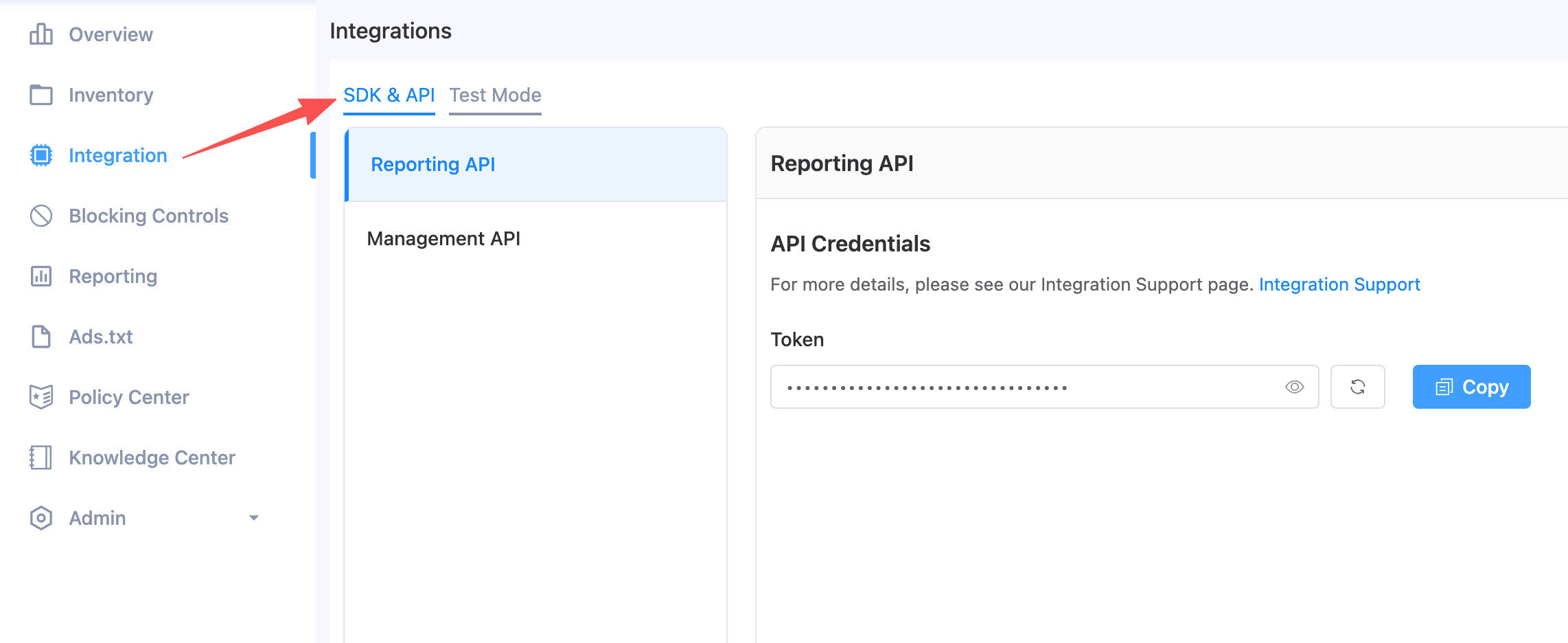
You can get your token by navigating to Integration -> SDK & API -> Reporting API on publisher portal (opens new window).
# Query Report Data
Retrieves report data with flexible filtering and grouping.
Endpoint: POST /openapi/report/v1/query
Request Body:
| Field | Type | Required | Description |
|---|---|---|---|
| filters | Filter[] | Yes | Filter conditions (must include day filter) |
| measurements | Measurement[] | Yes | Metrics and dimensions to retrieve |
| offset | int | No | Pagination offset (default: 0) |
| limit | int | Yes | Number of records to return |
Filter Object:
| Field | Type | Description |
|---|---|---|
| name | string | Filter field name (e.g., "day", "app_id", "slot_id") |
| value | any | Filter value (array for date range or ID list) |
Measurement Object:
| Field | Type | Description |
|---|---|---|
| name | string | Metric or dimension name |
| sort | string | Sort direction ("desc", "asc", or "" for no sorting) |
Available Measurements:
| Name | Type | Description |
|---|---|---|
| day | dimension | Date (YYYYMMDD) |
| publisher_id | dimension | Publisher ID |
| app_id | dimension | App ID |
| slot_id | dimension | Placement ID |
| country_code | dimension | Country code |
| traffic_type | dimension | Traffic type (App/Web) |
| sdk_ad_format | dimension | SDK ad format |
| os_type | dimension | Operating system type |
| costs | metric | Revenue (USD) |
| cost_ecpm | metric | eCPM (USD) |
| requests | metric | Ad requests |
| responses | metric | Ad responses |
| impressions | metric | Ad impressions |
| clicks | metric | Ad clicks |
| ctr | metric | Click-through rate |
| cpc | metric | Cost per click |
| fillrate | metric | Fill rate (responses/requests) |
| showrate | metric | Show rate (impressions/responses) |
Example Requests:
1. Query daily summary (metrics only, no dimension breakdown):
{
  "filters": [
    {"name": "day", "value": ["20260106", "20260113"]}
  ],
  "measurements": [
    {"name": "day", "sort": "desc"},
    {"name": "costs", "sort": ""},
    {"name": "requests", "sort": ""},
    {"name": "impressions", "sort": ""},
    {"name": "clicks", "sort": ""},
    {"name": "ctr", "sort": ""},
    {"name": "showrate", "sort": ""}
  ],
  "offset": 0,
  "limit": 50
}
2. Query with breakdown by publisher, app, and placement:
{
  "filters": [
    {"name": "day", "value": ["20260106", "20260113"]}
  ],
  "measurements": [
    {"name": "day", "sort": "desc"},
    {"name": "publisher_id", "sort": ""},
    {"name": "app_id", "sort": ""},
    {"name": "slot_id", "sort": ""},
    {"name": "costs", "sort": ""},
    {"name": "requests", "sort": ""},
    {"name": "impressions", "sort": ""},
    {"name": "clicks", "sort": ""},
    {"name": "ctr", "sort": ""},
    {"name": "showrate", "sort": ""}
  ],
  "offset": 0,
  "limit": 50
}
3. Query filtered by specific app:
{
  "filters": [
    {"name": "day", "value": ["20260106", "20260113"]},
    {"name": "app_id", "value": ["app13916722328256"]}
  ],
  "measurements": [
    {"name": "day", "sort": "desc"},
    {"name": "costs", "sort": ""},
    {"name": "requests", "sort": ""},
    {"name": "impressions", "sort": ""},
    {"name": "clicks", "sort": ""},
    {"name": "ctr", "sort": ""},
    {"name": "showrate", "sort": ""}
  ],
  "offset": 0,
  "limit": 50
}
4. Query filtered by specific placement (with all dimensions and metrics):
{
  "filters": [
    {"name": "day", "value": ["20260106", "20260113"]},
    {"name": "slot_id", "value": ["s13916752438656"]}
  ],
  "measurements": [
    {"name": "day", "sort": "desc"},
    {"name": "publisher_id", "sort": ""},
    {"name": "app_id", "sort": ""},
    {"name": "slot_id", "sort": ""},
    {"name": "country_code", "sort": ""},
    {"name": "traffic_type", "sort": ""},
    {"name": "sdk_ad_format", "sort": ""},
    {"name": "os_type", "sort": ""},
    {"name": "costs", "sort": ""},
    {"name": "cost_ecpm", "sort": ""},
    {"name": "requests", "sort": ""},
    {"name": "responses", "sort": ""},
    {"name": "impressions", "sort": ""},
    {"name": "clicks", "sort": ""},
    {"name": "ctr", "sort": ""},
    {"name": "cpc", "sort": ""},
    {"name": "fillrate", "sort": ""},
    {"name": "showrate", "sort": ""}
  ],
  "offset": 0,
  "limit": 50
}
Response for Example 1 (daily summary):
{
  "message": "ok",
  "rows": [
    {
      "day": "20260112",
      "costs": "0.015609749999999999",
      "requests": "141",
      "impressions": "13",
      "clicks": "1",
      "ctr": "0.07692307692307693",
      "showrate": "0.20967741935483872"
    },
    {
      "day": "20260107",
      "costs": "0",
      "requests": "0",
      "impressions": "0",
      "clicks": "0",
      "ctr": "0",
      "showrate": "0"
    }
  ],
  "statusCode": 0,
  "total": 2
}
Response for Example 2 (with dimension breakdown):
{
  "message": "ok",
  "rows": [
    {
      "day": "20260112",
      "publisher_id": "pub13124398458816",
      "publisher_name": "OperaRTB",
      "app_id": "app13336434553408",
      "app_name": "New SDK demo App",
      "slot_id": "s13584962043136",
      "slot_name": "New SDK demo App_Rewarded_Vertical",
      "costs": "0.010806749999999999",
      "requests": "0",
      "impressions": "9",
      "clicks": "1",
      "ctr": "0.1111111111111111",
      "showrate": "9"
    }
  ],
  "statusCode": 0,
  "total": 8
}
Response for Example 4 (all dimensions and metrics):
{
  "message": "ok",
  "rows": [
    {
      "day": "20260112",
      "publisher_id": "pub13124398458816",
      "publisher_name": "OperaRTB",
      "app_id": "app13336434553408",
      "app_name": "New SDK demo App",
      "slot_id": "s14353628765376",
      "slot_name": "New SDK demo App_Rewarded Interstitial_Vertical",
      "country_code": "US",
      "traffic_type": "App",
      "sdk_ad_format": "Rewarded Interstitial",
      "os_type": "ANDROID",
      "costs": "0",
      "cost_ecpm": "0",
      "requests": "16",
      "responses": "13",
      "impressions": "0",
      "clicks": "0",
      "ctr": "0",
      "cpc": "0",
      "fillrate": "0.8125",
      "showrate": "0"
    }
  ],
  "statusCode": 0,
  "total": 12
}
Response Fields:
| Field | Description |
|---|---|
| message | Status message |
| rows | Array of report data rows (fields depend on requested measurements) |
| statusCode | Status code (0 = success) |
| total | Total number of matching records |
# Error Handling
All API responses follow a consistent format:
Success Response:
{
  "code": 0,
  "msg": "ok",
  "data": { ... }
}
Error Response:
{
  "code": <error_code>,
  "msg": "<error_message>"
}
# Common Error Codes
| Code | Description |
|---|---|
| 400 | Bad Request - Invalid parameters |
| 401 | Unauthorized - Invalid or missing token |
| 403 | Forbidden - Insufficient scope |
| 500 | Internal Server Error |
# Rate Limiting
API requests are subject to rate limiting. If you exceed the rate limit, you will receive a 429 Too Many Requests response. Please implement appropriate retry logic with exponential backoff.